 Supabase-compatible backend, without Docker · Open source (MIT)
The Supabase-compatible backend that fits in a tin
Local Supabase dev without Docker — one process, real Postgres, and it even runs in the browser. The official supabase-js SDK works unchanged.
npx tinbase startWatch: a Supabase-compatible backend in a single process, in about two minutes.
Benchmark
A weight class you can deploy anywhere
The Supabase local stack is a 12-container, 2.3 GB Docker install. tinbase serves the same APIs from a single file at a fraction of the memory.



tinbase engines in colour; PocketBase and Supabase muted for context. † PocketBase is the smallest footprint, but it is SQLite behind a different API — not a drop-in for supabase-js, unlike every tinbase engine. Linear scale; Supabase local (2,291 / 1,626 MB) is a 12-container Docker stack whose bars run off the axis (torn end) so the single-process engines stay comparable. Physical footprint of the whole process tree (vmmap / docker stats), Apple Silicon · macOS 15 · bench/footprint.ts
Keep the SDK you already know
tinbase implements the PostgREST query grammar (filters, embedded resources, RPC), GoTrue auth flows, the Storage API, and the Realtime Phoenix protocol — verified by running the official SDK against it.
Row Level Security behaves exactly like hosted Supabase: every request runs with your JWT claims applied, so auth.uid() policies work as-is.
import { createClient } from '@supabase/supabase-js'

const supabase = createClient('http://127.0.0.1:54321', ANON_KEY)

await supabase.auth.signUp({ email, password })
await supabase.from('todos').insert({ title: 'hello' })

const { data } = await supabase
  .from('todos')
  .select('*, author:users(name)')
  .eq('done', false)

supabase.channel('feed')
  .on('postgres_changes',
      { event: 'INSERT', schema: 'public', table: 'todos' },
      handleNewTodo)
  .subscribe()
Architecture
One fetch handler, three engines
supabase-js talks to a single (Request) ⇒ Response handler that fans out to the service handlers, all sitting on one swappable database engine. The same handler is an HTTP + WebSocket server in Node, or runs in-process in a browser tab.
Studio
A dashboard in the box
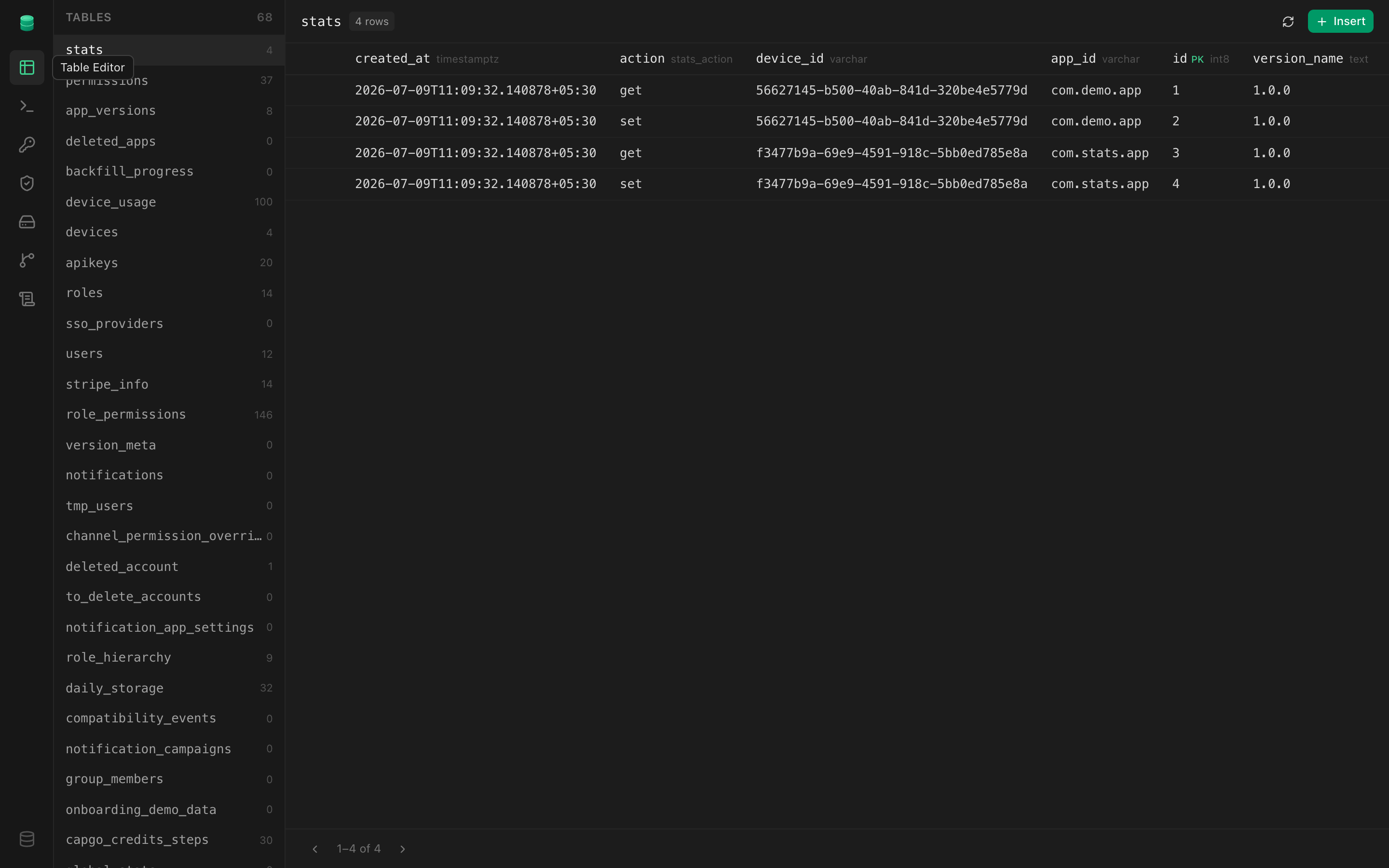
A Supabase-Studio-style dashboard ships at /_/ — table editor, SQL, auth, RLS policies, storage, and live logs. No extra process.
Why tinbase exists
tinbase came out of lifo and RapidNative with a hard goal: run an entire dev stack — database, auth, storage, realtime — in the browser and on phones, with no VMs and no cloud behind it. The first step was cutting the memory overhead of running that backend locally at all; the next was making the very same backend run in-process, inside a browser tab.
That is why every service is a pure fetch handler and the database can be pure JavaScript. Along the way it became something else too: a Docker-free, drop-in replacement for local Supabase development that covers most use cases — so it is open source for everyone.
Why tinbase
supabase-js works unchanged
REST, Auth, Storage, and Realtime speak the same wire protocols as hosted Supabase. Point the official SDK at tinbase and your app just runs.
Real Postgres, really small
RLS policies, auth.uid(), jsonb, triggers, foreign keys. Choose embedded native Postgres 17 (59 MB RAM) or PGlite WASM for zero-setup portability.
One file to deploy
A single 58 MB executable with no Node, npm, or Docker on the target machine. Postgres binaries (12 MB) auto-download on first run.
Your migrations stay portable
Reads supabase/migrations/*.sql and seed.sql exactly like the Supabase CLI, tracked in the same table. Outgrow tinbase? Push the same files to hosted Supabase.
Auth, including OAuth
Email/password, anonymous, OTP, magic links, password recovery, and OAuth (Google/GitHub + generic) with PKCE — all through supabase.auth, reading your existing config.toml providers.
Edge Functions
supabase.functions.invoke() runs your handlers in-process, loaded from supabase/functions/ with the verified auth context and env keys.
Webhooks, cron & queues
Database webhooks (CDC → HTTP), cron.schedule() jobs, and a pgmq queue subset — the automation layer, natively, with no pg_net/pg_cron/pgmq extension needed.
Typed clients & Studio
tinbase gen types typescript for a fully typed createClient<Database>, plus a Supabase-Studio-style dashboard at /_/ (tables, SQL, auth, storage, RLS policies).
Realtime with RLS
postgres_changes, broadcast, and presence — with per-subscriber RLS filtering so users only receive change events for rows they can see.
Runs in the browser
Every service is a pure fetch handler. Hand it to supabase-js as a custom fetch and the entire backend — database included — runs in-process, no server.
Or bring your own Postgres
Point tinbase at a Postgres you already run with --database-url — REST, Auth, and Storage against your own database, over TCP with SCRAM auth and an idempotent, shared-safe bootstrap.